Skip to content
Product

Every project. Every team. One place.

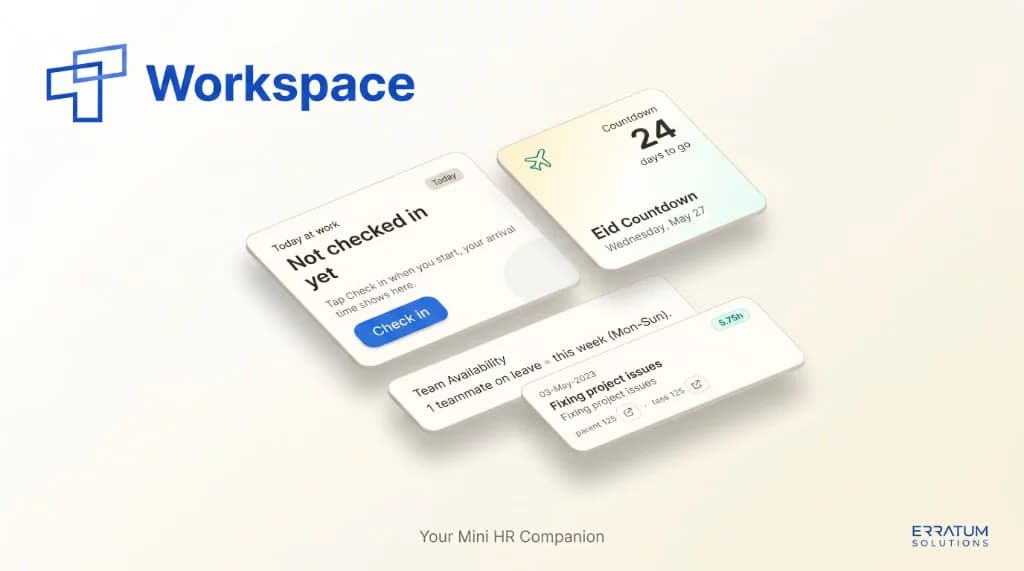
Your mini HR companion

Built by Erratum Solutions for software teams: attendance, delivery, and company knowledge in one installable app.

Workspace is employee management software for software companies. Check in and out with notes, log hours against GitHub tasks, request time off, track projects, and ask an in-house AI that knows your docs, team memory, and live roster data.

Request a demo
Workspace employee management app promotional graphic

Daily operations

HR routines your team actually opens

Attendance, logging, and leave in one surface instead of five different tools.

  • Check-in and check-out

    Start and end the day with office, remote, or WFH mode, optional notes, and arrival time on the dashboard.

  • Attendance

    Shift-aware records with late tracking, worked-days progress, and a team view filtered by date.

  • Work log

    Log hours against projects and GitHub task IDs. Filter by teammate, project, date, or parent task.

  • Time off

    Submit leave for manager approval. Day counts skip weekends and public or company holidays from AppClust.

Inside the app

Every screen in Workspace

Tab through dashboard, work log, team calendar, and projects. Screenshots advance on their own, or pick a view.

Workspace dashboard with check-in, work-log progress, and shortcuts

Delivery

From GitHub board to logged hours

Projects, tasks, and reports stay tied to the work your team ships.

  • GitHub task sync

    Kanban board synced from GitHub Projects. Group by status, assignee, or priority and log time straight from a task card.

  • Projects portfolio

    See active and completed projects with seven-day and all-time hours, assigned teammates, and quick health notes.

  • Personal reports

    Attendance, leave, and work-log summaries for any date range, with CSV export when finance or ops needs a file.

Ask Erratum AI

The brain of your software company

Private AI that answers like ChatGPT but reads your docs, approved team memory, and live workspace data.

  • Company context, not generic chat

    Ask AI routes questions across docs, GitHub, work logs, attendance, leave, projects, and roster data so answers match how your team actually works.

  • Team memory with lead review

    Useful answers can be suggested, reviewed, and shared as cited memory so knowledge spreads without another wiki nobody opens.

  • Private chats per teammate

    Each person keeps their own thread. Only approved snippets enter shared memory, so debugging notes stay private until a lead says otherwise.

  • Smart and fast modes

    Smart mode pulls full internal context for architecture or estimate questions. Fast mode answers quicker when you only need a short check.

Workspace promotional graphic showing dashboard, projects, calendar, and work logs

Knowledge and growth

Docs, calendar, and coaching in the same app

  • Knowledge base

    Markdown runbooks and decisions with draft-to-publish workflow, tag folders, search, and print-friendly pages indexed into Ask AI.

  • Growth Insights

    Personal AI coaching from the last 30 completed days: attendance habits, focus patterns, docs published, and practical next steps.

  • Team calendar and holidays

    Approved leave and company holidays in one month view. Public holidays and internal days off show alongside personal reminders.

Technology

Stack behind Workspace

  • Next.js and React

    Server-rendered app with fast client navigation, OTP login, and installable PWA shell.

  • AppClust

    ERP API for roster, attendance, leave requests, work logs, projects, docs, and reminders.

  • GitHub Projects

    Live task board with cached fallback, CSV export, and one-tap work-log prefill from issues.

  • OpenAI and Supabase

    pgvector retrieval over published docs plus gpt-4o-mini for Ask AI and Growth Insights coaching.

A day with Workspace

How a software team moves through the app

  1. 01

    Check in

    Pick office or remote, add a short plan note, and see who else is on the floor today.

  2. 02

    Pull work from GitHub

    Open the synced task board, filter to your stream, and read issue detail without leaving Workspace.

  3. 03

    Log hours on the task

    Tap Log entry on a card. Hours attach to the project and parent task ID for clean reporting.

  4. 04

    Scan the team calendar

    See who is on approved leave this week and which public or company holidays are coming up.

  5. 05

    Ask AI with company context

    Start a private chat grounded in docs and team memory when you need how-we-build guidance, not a generic answer.

One app

Replace the tab sprawl

14+

modules in one PWA

Dashboard, People, Work log, Projects, Attendance, Time off, Holidays, Team calendar, Reports, Knowledge base, Tasks, Ask AI, Growth Insights, and reminders. One login, one roster, one place for how your software company runs.

Want Workspace for your software team?

We can adapt this employee OS for your roster, GitHub org, and compliance rules. Tell us your team size and what you track today.

Request a demo

FAQ

Questions about Workspace

Plain-language answers about what Workspace does and who it is for.

What is Workspace?

Workspace is an employee management web app Erratum Solutions built for software teams. It covers check-in and check-out, work logs, time off, attendance, projects, a team calendar, an internal knowledge base, and company-grounded AI in one installable PWA.

Who is Workspace for?

Workspace is for software companies that want one place for HR routines and delivery work. It suits teams that already use GitHub Projects and need attendance, leave, and work logging tied to real tasks instead of scattered spreadsheets and browser tabs.

How does check-in and check-out work?

Teammates check in when they start the day and check out when they finish. They can pick office, remote, or work-from-home, add a short note, and see arrival time on the dashboard. Managers can review attendance history and who is on the floor today.

How do work logs connect to GitHub tasks?

Workspace syncs a kanban board from GitHub Projects. Open a task, tap Log entry, and the work log form fills with the task title and IDs. Hours attach to the right project so delivery and billing reports stay aligned with what shipped.

What is Ask Erratum AI compared with ChatGPT?

Ask Erratum AI is a private in-app assistant grounded in your company. It can read published knowledge-base docs, lead-approved team memory, GitHub tasks, work logs, attendance, leave, and roster data. ChatGPT does not know how your team builds or what your runbooks say.

What is team memory?

Team memory is a lead-reviewed snippet queue. When Ask AI surfaces a useful answer, a teammate can suggest it for sharing. After a lead approves it, future answers can cite that memory so playbooks spread without copying long threads into wikis.

What is Growth Insights?

Growth Insights is a personal coaching view built from the last 30 completed workdays. It reads attendance habits, work-log patterns, docs published, team memory contributions, and GitHub activity, then returns practical advice without ranking people against each other.

Does Workspace work on mobile?

Yes. Workspace is a progressive web app you can install on phone or desktop. It ships with a branded splash screen, offline-friendly task caching, and browser notifications for reminders and checkout nudges.

What backend does Workspace use?

Roster, attendance, leave, work logs, projects, and documentation sync through AppClust, Erratum's ERP API. GitHub Projects supplies tasks. Ask AI uses OpenAI with Supabase pgvector for retrieval over published docs and approved team memory.

How do teams get access?

Access is roster-gated. An admin adds the employee in AppClust, then the person signs in with a one-time code emailed to their work address. No shared passwords, and people not on the roster cannot sign in.

More work